
Anúncios
Managing a cluttered inbox can feel overwhelming, but the right email cleaning app can transform your digital life with just a few taps.

Email overload has become one of the most common productivity killers in our modern digital world. Whether it’s promotional messages, outdated newsletters, or spam that somehow slipped through the filters, an unorganized inbox drains time and mental energy. Fortunately, specialized applications designed to clean and organize email have emerged as powerful solutions to reclaim control over your digital communication.
Anúncios
These tools go beyond simple deletion—they offer intelligent sorting, bulk actions, privacy protection, and automation features that help you maintain a pristine inbox effortlessly. Let’s explore how email cleaning apps work, why they’re essential, and how to choose the best one for your needs.
📧 Why Your Inbox Needs a Deep Clean
The average professional receives over 120 emails per day, and most of us only actively engage with a fraction of them. The rest accumulate like digital dust, creating visual clutter and making it harder to find important messages when you need them most.
Anúncios
An overloaded inbox doesn’t just waste storage space—it impacts your productivity and peace of mind. Studies show that email overload contributes to stress, decision fatigue, and reduced focus. When you open your email app and see thousands of unread messages, your brain experiences a mild anxiety response, even if you’re not consciously aware of it.
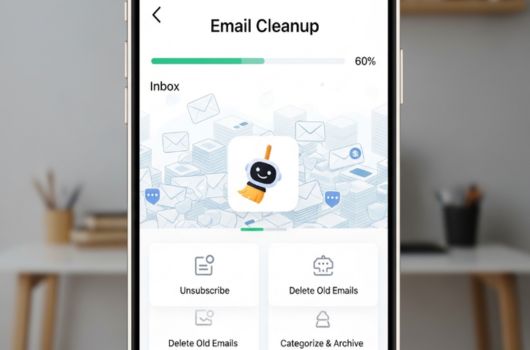
Email cleaning apps address this problem systematically. They identify patterns in your inbox, group similar messages together, and give you the power to delete, archive, or unsubscribe from bulk senders with a single action. This transforms what would be hours of manual work into minutes of smart automation.


🛠️ Key Features That Make Email Cleaning Apps Essential
Not all email cleaning applications are created equal. The best ones share certain powerful features that make inbox management both efficient and painless.
Bulk Email Management
The ability to select and delete thousands of emails at once is perhaps the most fundamental feature. Quality apps let you filter messages by sender, date range, size, or whether they contain attachments, then perform bulk actions instantly.
This is particularly useful when dealing with promotional emails from retailers, social media notifications, or automated updates that pile up over time. Instead of individually selecting messages, you can clear entire categories in seconds.
Smart Categorization and Filters
Advanced email cleaners use artificial intelligence to automatically categorize your messages into groups like “Newsletters,” “Social Media,” “Finance,” or “Promotions.” This organization happens in the background, creating a cleaner interface without manual sorting.
You can then review each category and decide what to keep, archive, or delete. Some apps even learn from your behavior, improving their categorization accuracy over time based on which emails you open and which you ignore.
Unsubscribe Automation
One of the most tedious tasks in email management is unsubscribing from unwanted mailing lists. Many apps now include one-click unsubscribe features that automatically locate and process unsubscribe links across multiple senders simultaneously.
This feature alone can prevent hundreds of future emails from cluttering your inbox, making it a proactive solution rather than just a reactive cleanup tool.
Privacy and Security Protection
Reputable email cleaning apps take privacy seriously. They use read-only access to your email, meaning they can view and organize messages but cannot send emails on your behalf or access sensitive content beyond what’s necessary for cleaning.
Look for apps that use encryption, don’t store your emails on their servers, and comply with privacy regulations like GDPR. Your email contains sensitive information, so security should never be compromised for convenience.
Multi-Account Support
Most people juggle multiple email accounts—work, personal, side projects, and more. The best cleaning apps support multiple accounts across different providers (Gmail, Outlook, Yahoo, iCloud, etc.) within a single interface.
This unified approach means you can clean all your inboxes from one place, saving time and mental energy switching between different apps and accounts.
✨ How Email Cleaning Apps Actually Work
Understanding the technology behind these apps helps you appreciate their value and use them more effectively. Most email cleaners operate through secure API connections to your email provider rather than storing your password directly.
When you connect an account, the app receives permission to read and modify your emails within specific parameters you authorize. It then scans your inbox, analyzing metadata like sender information, subject lines, dates, and engagement patterns (which emails you open versus ignore).
Using this data, the app creates intelligent groupings and recommendations. For example, it might notice you never open emails from a particular retailer and suggest unsubscribing. Or it might identify old promotional emails taking up space and offer to delete them in bulk.
The entire process happens quickly because these apps are optimized for efficiency, using cloud processing and smart algorithms to handle even massive inboxes with tens of thousands of messages.
🎯 Choosing the Right Email Cleaning App for Your Needs
With numerous options available, selecting the best email cleaning app depends on your specific situation and priorities. Consider these factors when making your choice.
Email Provider Compatibility
First, ensure the app supports your email provider. While most work with popular services like Gmail, Outlook, and Yahoo, some have limitations with corporate email systems or niche providers.
Check compatibility before committing to a subscription, especially if you use email through a work domain with specific security protocols.
Platform Availability
Do you primarily manage email on your phone, tablet, or desktop? Some apps offer robust mobile experiences but limited desktop functionality, while others work best on computers with larger screens for reviewing bulk actions.
Ideally, choose an app with cross-platform support so you can clean your inbox from any device, with changes syncing automatically across all platforms.
Pricing and Value
Email cleaning apps range from completely free to premium subscriptions. Free versions typically offer basic bulk deletion and limited categorization, while paid tiers unlock advanced features like automated rules, deeper analytics, and priority support.
Evaluate whether the time saved justifies the cost. For professionals drowning in emails, a premium subscription often pays for itself in recovered productivity within the first month.
User Interface and Experience
An app can have powerful features, but if the interface is confusing or clunky, you won’t use it consistently. Look for clean, intuitive designs that make email management feel simple rather than overwhelming.
Read user reviews focusing on ease of use, and if possible, try free trials before committing to paid plans.
💡 Best Practices for Maintaining a Clean Inbox
Installing an email cleaning app is just the first step. To maintain long-term inbox zen, adopt these smart habits that work alongside your chosen tool.
Schedule Regular Cleaning Sessions
Rather than letting emails accumulate for months, set aside 10-15 minutes weekly to review and clean your inbox using your app. Regular maintenance prevents overwhelming buildup and makes each session quick and manageable.
Many apps offer reminder features or scheduled automation to handle routine cleaning tasks without manual intervention.
Be Ruthless with Unsubscribes
When you notice you’re consistently deleting emails from certain senders without reading them, it’s time to unsubscribe. Don’t feel guilty—your attention is valuable, and companies expect a certain percentage of list churn.
Use your app’s unsubscribe feature liberally during your first major cleanup, and continue unsubscribing as new unwanted senders appear.
Create Custom Filters and Rules
Most email cleaning apps let you create custom rules for ongoing automation. For example, you might automatically archive all social media notifications older than seven days, or move receipts to a specific folder for easy tax preparation.
Spend time setting up these rules initially, and they’ll work silently in the background, maintaining organization without ongoing effort.
Archive Rather Than Delete When Uncertain
If you’re not sure whether you’ll need certain emails in the future, archive them instead of deleting. This removes them from your inbox view while preserving them for future reference if necessary.
Most email services offer essentially unlimited archive storage, so you can be generous with archiving without worrying about space constraints.
🚀 The Impact of a Clean Inbox on Productivity
The benefits of maintaining a clean inbox extend far beyond aesthetics. Research on digital productivity reveals that organized email directly correlates with reduced stress, improved focus, and faster response times to important messages.
When your inbox contains only relevant, actionable emails, you can process messages more efficiently. You’re not wasting cognitive energy scanning through clutter to find what matters, which means more mental bandwidth for actual work.
Many users report that achieving “Inbox Zero”—or even just getting below 50 messages—creates a sense of accomplishment and control that positively affects other areas of their work and life. The psychological impact of digital organization shouldn’t be underestimated.
Email cleaning apps make this level of organization accessible to everyone, not just productivity experts with extensive time management systems. They democratize inbox organization through automation and intelligent assistance.
🔐 Privacy Considerations When Using Email Cleaning Tools
Given that email contains sensitive personal and professional information, privacy and security should be top priorities when selecting a cleaning app. Here’s what to look for and questions to ask.
Data Access and Permissions
Carefully review what permissions you’re granting when connecting your email account. Reputable apps request minimal necessary access—typically read and modify permissions for emails only, without access to contacts, calendar, or the ability to send emails.
Be wary of apps requesting broader permissions than necessary for their stated function.
Server-Side Storage Policies
Ask whether the app stores copies of your emails on their servers or processes everything client-side. The best security-conscious apps minimize or eliminate server-side storage, reducing the risk of data breaches.
Review the company’s privacy policy to understand data retention practices and whether they share information with third parties.
Encryption and Security Standards
Look for apps that use industry-standard encryption for data transmission and comply with security frameworks like SOC 2. These certifications indicate the company takes security seriously and follows best practices.
Two-factor authentication for the app itself adds an extra layer of protection, ensuring that even if someone gains access to your device, they can’t easily access your email cleaning app and the permissions it holds.
📊 Measuring the Success of Your Email Cleanup
How do you know if your email cleaning efforts are working? Track these metrics to gauge improvement and maintain motivation.
First, monitor your total email count over time. Most cleaning apps provide analytics showing how many emails you’ve deleted, archived, or unsubscribed from since you started using the service. Watching these numbers grow can be surprisingly satisfying.
Second, pay attention to how quickly you reach “inbox zero” or your target inbox size during weekly cleaning sessions. As you eliminate recurring junk through unsubscribes and better filters, each cleanup should become faster.
Third, notice your subjective experience. Do you feel less anxious when opening your email app? Can you find important messages more quickly? These qualitative improvements matter just as much as quantitative metrics.
Finally, consider your email response time for important messages. A clean inbox typically leads to faster responses because you’re not missing critical emails buried under promotional clutter.
🌟 Advanced Features Worth Exploring
Once you’ve mastered basic email cleaning, explore these advanced features offered by premium email management apps to take your organization to the next level.
Smart Reminders and Follow-Ups
Some apps can remind you about emails that need follow-up if you haven’t received a response within a specified timeframe. This feature is invaluable for professional correspondence where timely follow-ups matter.
Email Analytics and Insights
Detailed analytics show patterns in your email behavior—who sends you the most messages, when you’re most active, which types of emails you engage with, and more. These insights help you make informed decisions about email management strategies.
Temporary Email Addresses
Some cleaning apps offer disposable or alias email addresses for signing up for services where you don’t want to share your primary email. Messages sent to these addresses forward to your main inbox but can be easily filtered or deleted in bulk.
Integration with Productivity Tools
Advanced apps integrate with task managers, calendars, and note-taking apps, allowing you to convert emails into actionable tasks or calendar events directly from the cleaning interface.
🎓 Learning from Email Organization Experts
Productivity experts and email power users have developed strategies that complement email cleaning apps beautifully. Adopting even a few of these practices can multiply the effectiveness of your chosen tool.
The “Two-Minute Rule” suggests that if an email can be handled in two minutes or less, do it immediately rather than letting it sit. This prevents small tasks from accumulating into overwhelming backlogs.
The “Inbox as To-Do List” approach treats your inbox as a temporary holding area only for emails requiring action. Once you’ve acted on an email—or decided no action is needed—it gets archived or deleted immediately.
Regular “email bankruptcy” declarations, where you archive everything older than a certain date and start fresh, can be liberating when you’re facing truly overwhelming backlogs. Email cleaning apps make this nuclear option quick and painless.
🔄 Making Email Cleaning a Sustainable Habit
The key to long-term inbox organization isn’t a one-time massive cleanup—it’s building sustainable habits supported by the right tools. Your email cleaning app should become part of your regular digital hygiene routine, like updating software or backing up files.
Start small with just 5-10 minutes of cleanup twice weekly. As you see results and the process becomes easier, you can adjust the frequency and duration based on your email volume.
Celebrate milestones like reaching inbox zero, unsubscribing from your 100th mailing list, or deleting your 10,000th email. These small victories reinforce the behavior and make email management feel rewarding rather than burdensome.
Remember that perfection isn’t the goal—progress is. Even reducing your inbox by 50% or eliminating half your unwanted subscriptions represents significant improvement worth acknowledging.
💬 Real User Experiences and Success Stories
Across review platforms and user communities, people share remarkable transformations after adopting email cleaning apps. One common theme emerges: the psychological relief of finally conquering email overwhelm.
Users frequently report going from 30,000+ unread emails down to under 100 within their first week using a cleaning app. Others describe finally unsubscribing from hundreds of newsletters they signed up for years ago and forgot about.
Professional users note improved response times to client emails and reduced anxiety about missing important messages buried in clutter. The consensus is clear—while email cleaning apps require a small time investment upfront, the ongoing benefits far exceed the initial effort.
These success stories aren’t about achieving some impossible standard of digital perfection. They’re about regular people using smart tools to regain control over a communication channel that had become a source of stress rather than productivity.
🌈 Your Path to Email Liberation Starts Today
Email overload doesn’t have to be your permanent reality. With the right cleaning app and a commitment to better email habits, you can transform your inbox from a source of stress into a well-organized communication tool that actually serves you.
The technology exists, it’s accessible, and it works. Whether you choose a free basic app or invest in a premium solution with advanced features, taking that first step toward inbox organization will pay dividends in productivity, reduced stress, and peace of mind.
Start with a thorough initial cleanup using bulk deletion and unsubscribe features. Then establish a simple maintenance routine—perhaps 10 minutes every Monday morning—to prevent future buildup. Before long, email management will shift from overwhelming chore to quick routine task.
Your inbox is a reflection of how you interact with the digital world. By taking control of it through smart tools and intentional habits, you’re not just organizing emails—you’re reclaiming time, attention, and mental energy for what truly matters in your work and life.
